Keep fleet documents organised. Stay on top of renewals.
Manage driver and vehicle documents inside MyGeotab. See what needs renewing, collect files through Geotab Drive, and use AI assistance to reduce manual entry.
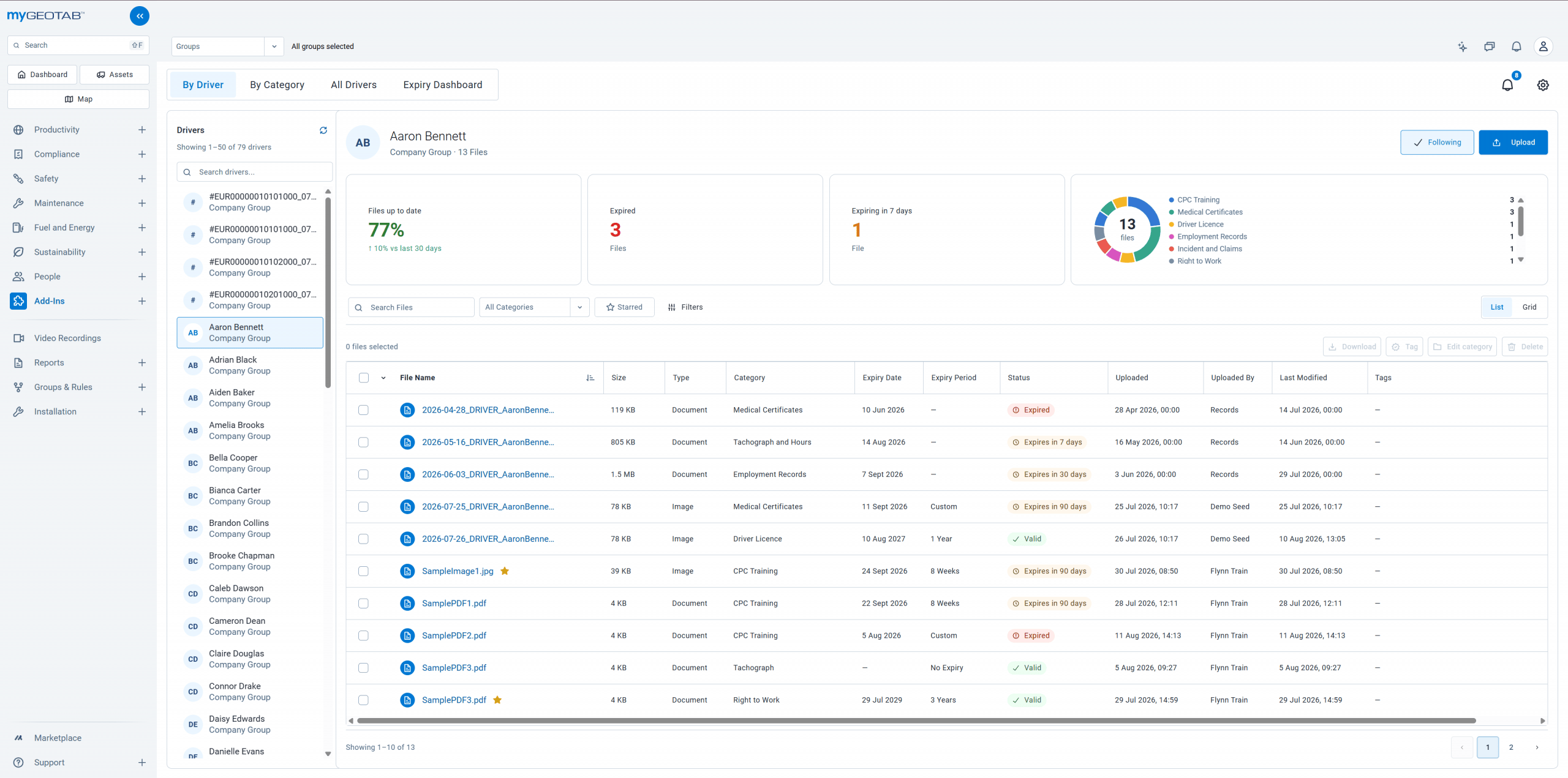
Find the right document
Keep licences, certificates and vehicle records linked to drivers and assets.
See what’s due
Spot expired documents and upcoming renewals in your fleet dashboards.
Collect files from drivers
Drivers send photos and documents through My Files in Geotab Drive.
Reduce manual entry
AI assistance pre-fills supported details for review, when configured.

Make renewals easier to manage.
See which documents have expired and which renewals are approaching, then follow up with the relevant driver or asset.
- Driver and asset document dashboards
- Search, filter and preview files in MyGeotab
- Configurable reminders and automation
From a driver’s phone to their fleet record.
Collect documents where your drivers already work: the Geotab Drive app.
- 1
Capture
Take a photo or select a file in My Files.
- 2
Review
AI assistance pre-fills supported details. The driver checks the result before uploading.
- 3
Manage
The office finds the upload against the driver’s record in File Manager Geotab Add-In.


Capture → Review → Manage · illustrative sample data
A closer look at File Manager Geotab Add-In.
Explore the add-in and see how AI-powered category templates work.


The details your team needs.
Organise and collaborate
Categories, tags, favourites, comments and mentions help your team find files and work together.
Capture consistent information
Custom forms support signatures, odometer readings, locations and vehicle damage records.
Control access and changes
Manage permissions, review version history and recover deleted files during the retention period.
Explore all File Manager Geotab Add-In features
- Driver and asset document management: keep licences, certificates, inspection records and other files linked to the relevant driver or asset.
- Flexible organisation: arrange documents into categories and subcategories, add tags and star frequently used files.
- Search and filtering: find documents across your fleet, or browse by driver, asset or category.
- Built-in previews: view PDFs, images and Word documents directly in the add-in.
- Expiry tracking: identify expired documents and upcoming renewals.
- Fleet dashboards: see document expiry status at a glance and identify drivers or assets needing attention.
- Custom forms and templates: capture consistent information, including signatures, odometer readings, locations and vehicle damage.
- AI assistance: pre-fill fields from uploaded documents and create editable form templates from sample documents, when configured.
- Document updates and history: replace outdated files and review previous versions and recorded activity.
- Team collaboration: discuss files through comments and mentions, and share direct links with colleagues who have access.
- Notifications: follow drivers, assets or categories to stay informed about changes.
- Bulk actions: download, tag, categorise or delete multiple files together.
- Access controls: manage who can view, upload, download, edit, share or delete documents, using Geotab security clearances and category and file permissions.
- Deleted-file recovery: restore documents accidentally deleted during the retention period.
- Geotab Drive access: let drivers search and view permitted documents through the My Files page in the Geotab Drive app.
- Configurable automation: trigger emails, Drive messages or generated PDF documents from uploads, changes, approaching expiry dates or schedules, when enabled.
- Choose your cloud storage region: control where your data and files are stored, with a choice of cloud regions worldwide.
- Familiar MyGeotab experience: built with Geotab’s Zenith design system, the add-in looks and feels like MyGeotab, making it easy for your team to get started.
Useful to know.
Can drivers use it in Geotab Drive?
Drivers can upload files and search or view permitted documents through My Files in Geotab Drive.
How does the AI assistance work?
When configured, AI assistance can pre-fill supported details from uploaded documents and create editable form templates from sample documents. Drivers review the results before uploading.
Can we control who accesses documents?
Access controls use Geotab security clearances alongside category and file permissions to manage who can view, upload, download, edit, share or delete documents.
Where are documents stored?
File Manager Geotab Add-In offers a choice of cloud storage regions. Discuss the available options for your fleet during your demo.
See File Manager Geotab Add-In working with your fleet’s documents.
Explore document management, expiry tracking and driver uploads in a demo.